

.avif)

How To Set Up QR Code Analytics and Measure Campaign Success
On This Page
You hand someone a QR-enabled business card at a conference and later wonder who actually followed up. QR Code Analytics turns those anonymous scans into valuable data, scan counts, location, device type, click-through rates, and conversion signals, so you can see what works and what needs fixing. This article will show you how to track and analyze QR code campaigns effectively so you can measure performance, optimize engagement, and achieve better marketing results.
To make that practical, Mobilo's digital business card provides an easy analytics dashboard with real-time scan tracking, audience insights, UTM support, and conversion metrics, so you can test ideas, attribute results, and improve ROI.
Summary
- Dynamic QR codes are the backbone of measurement, and 79% of businesses use them for personalized interactions because they capture scan frequency, geolocation, device type, timestamps, and redirect paths that static codes cannot track.
- Tracked QR campaigns can directly influence revenue: a ViralQR study reports that 60% of QR code scans result in a purchase, underscoring the importance of scan-to-contact and scan-to-opportunity metrics.
- Consumer adoption is already high: 70% of consumers scanned a QR code in the past month, and the global QR market is projected to reach $12.1 billion by 2025, indicating strong near-term demand and growing enterprise tooling.
- Enterprise deployments must prioritize governance and scalability, ensuring analytics remain auditable for thousands of users. Standardizing link taxonomies in pilots reduced reconciliation time from multiple days to under 24 hours.
- Focus on conversion-first KPIs, for example, percent of scans that create or enrich CRM records and revenue per thousand scans, implement monitoring rules such as alerting when scan volume drops below 60% of a comparable day, and measure outcomes within a 72-hour attention window.
- Run disciplined experiments and segment by intent, targeting at least 100 scans per variant before making decisions, and use thresholds like two scans within 48 hours to escalate lead scoring because repeat scanners in that window signal higher propensity.
This is where Mobilo's digital business card fits in; it addresses these needs by offering real-time scan tracking, UTM support, and CRM integrations that route scanned leads into workflows while maintaining audit trails.
What You're Missing by Ignoring QR Code Data
QR scans are not just clicks; they are measurable events that reveal behavior you can act on. When you capture scan frequency, location, device, and timing, those signals become lead-qualification rules, follow-up triggers, and campaign attributions rather than noise.
Why Should You Treat QR Scans Like Measurable Events?
This pattern appears across trade shows, retail displays, and direct mail. A QR code is printed, scans occur, and no one knows which scans counted. The result is wasted spend and slow follow-up because teams lack the context to prioritize leads.
When we compare campaigns that used trackable QR links to those that did not, the difference is clear in how quickly marketing can route qualified contacts into sales workflows and how accurately teams can report event ROI.
What Gets Lost When QR Codes Are Treated as Static Assets?
Most teams add a QR because it is easy and familiar, not because they intend to measure anything. That familiar approach works until you need to prove attribution, segment audiences, or stop chasing false positives.
Without analytics, you lose micro-behaviors such as repeat scans from the same region, device-specific friction points, and time-of-day patterns that predict conversions. It’s exhausting when post-event follow-up feels random rather than prioritized; the emotional toll shows up as missed meetings and dwindling momentum.
How Do Dynamic QR Codes Change the Game?
Dynamic QR codes route to a short, editable URL, so every scan is recorded as an event, not a dead-end link. That unlocks scan analytics, including geolocation, operating system, timestamps, and referrer data, and lets you swap destinations mid-campaign to A/B test creative or correct mistakes without reprinting.
Given how rapidly adoption is rising, with QR Code Statistics for 2025 reporting that 70% of consumers have scanned a QR code in the past month, treating scans as analytics-ready events is no longer optional; it is expected behavior for modern programs.
How Does Market Momentum Affect Your Choices?
Market investment and tooling mature alongside adoption, so the infrastructure you choose matters. The same source, QR Code Statistics for 2025, projects the global QR code market will reach $12.1 billion in 2025, which means more vendors, better tracking, and richer integrations are coming online. That growth is an opportunity if you choose a platform that supports enterprise needs rather than a consumer shortlink service that stores data in a silo.
What Signals Should You Expect From a Mature QR Analytics Layer?
Think of scan events like tiny GPS breadcrumbs in a user journey. Proper signals include repeat versus unique scans, peak scan windows, device OS breakdowns, campaign tag attributions, and geo-clustering that highlights high-value locations.
Combine those with CRM enrichment, and you get lead scoring that reflects both intent and proximity, not just a name on a card. That level of detail transforms operational choices. Staffing, routing, and personalized outreach become data-driven instead of reactive.
Related Reading
- Best Business Card Scanner
- What Makes a Good Business Card
- Business Card Trends
- QR Code Marketing Strategy
- What Are NFC Business Cards
- Professional Networking Tools
- New QR Code Technology
- Best Paid QR Code Generator
- What to Include on a Business Card
What Do QR Code Analytics Reveal About Your Audience?
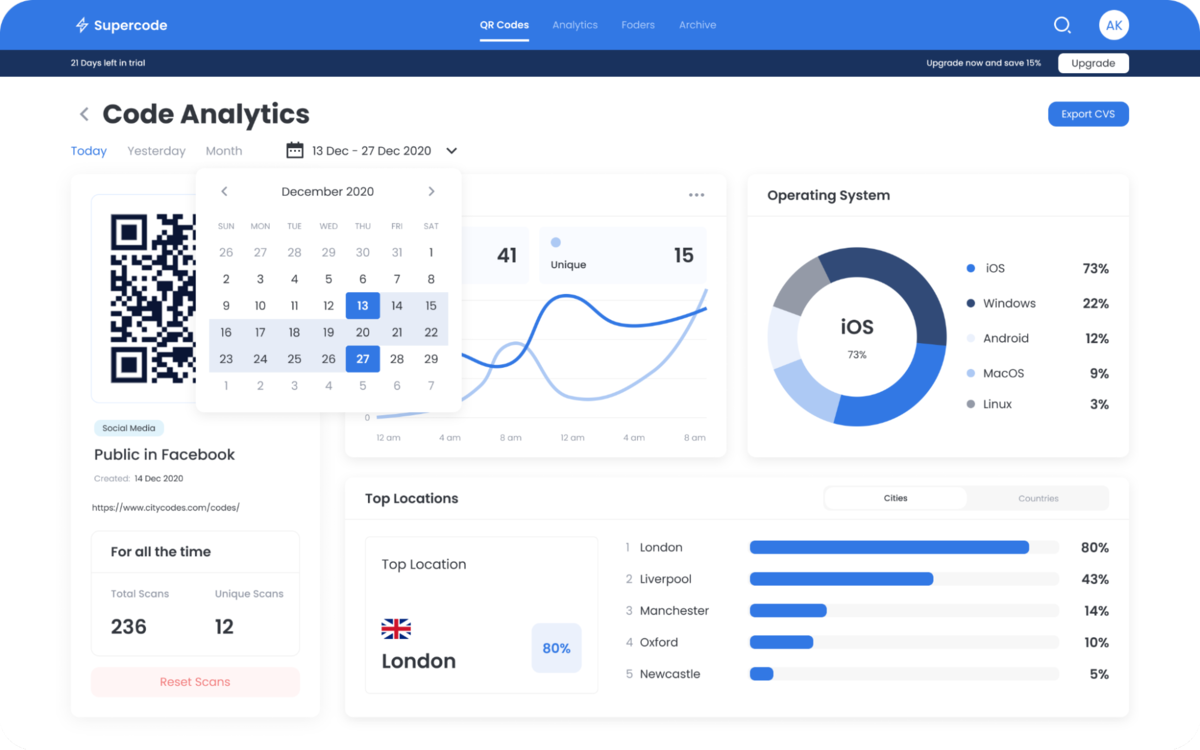
QR Code analytics is the measurement layer that turns each scan into a structured event you can act on, not just a tally. It captures everything from the scan origin to the downstream outcome, then maps those signals into lead records, routing rules, and performance metrics you can trust.
What are QR Code Analytics?
QR Code analytics collects event-level data from the moment a code is scanned and enriches and timestamps the event for attribution and action. Technically, this means combining short-link server logs, user agent strings, and referrer metadata with any app-level callbacks or webhook confirmations so each scan becomes an auditable record. Practically, that lets you trace an individual scan back to a printed batch, a salesperson, or a specific campaign creative without guessing.
The Advantages of QR Code Analytics
You get three business wins when scan events are instrumented and integrated properly:
- Faster, prioritized follow-up
- Measurable campaign ROI
- Cleaner operational playbooks
For example, teams that convert scan events into CRM records can measure follow-up latency as an actual KPI and reduce wasted outreach by routing high-intent scans to the right rep immediately.
Adoption matters here, since 57% of consumers have scanned a QR code in the past year. That 2023 figure shows QR codes are mainstream enough to be a reliable data source, and, with 75% of people saying they are likely to use QR codes more often in the future, according to the same 2023 report, the signal set only grows richer over time.
What Types of Data Can QR Code Analytics Yield?
Total Scans
Total scans are a start, but treat them as an index you can slice. Break totals by print batch, creative variant, or distribution channel to spot one-off wins or placement flops. For instance, comparing total scans across two postcard runs will show which printing vendor or placement delivered the actual reach you paid for.
Unique Scans
Unique scans identify distinct devices or IDs, which helps deduplicate leads and estimate audience size. Combine unique-scan counts with CRM merges to measure duplicate creation rates and to tune de-duplication rules so sales do not chase the same lead twice.
Location Data
Location can be sourced from IP-based geolocation or device GPS when the landing flow requests it. Understand precision limits. IP geolocation is coarse indoors, and carrier routing can shift the apparent location. Use location for prioritization rather than exact address, for example, routing region-specific leads to local reps when city-level clustering suggests real proximity.
Device Type and Operating System
Knowing whether a scan originated from iOS, Android, or a desktop affects the post-scan experience and performance. You can send Android users to an in-app flow, iOS users to a universal link, and desktop scans to a rich landing page, reducing friction and improving conversion rates.
Other Helpful Metrics
Beyond the basics, enterprise-grade QR analytics capture:
- Scan the timestamp distribution to identify micro-windows of heavy activity.
- Scan repeat patterns, which show intent when a person scans the same code multiple times across hours or days.
- Landing outcome events, such as vCard downloads, file downloads, or form completions, to measure scan-to-conversion latency.
- Referrer data, which reveals whether scans come from printed materials, emails, or social posts.
- Health signals, like failed scans, server-side redirects, or expired codes, prevent silent campaign failures.
Why Each Metric Matters, with examples
Scan timestamps let you staff the right shifts, not guess. If scans peak at 8:30 a.m., routing them to a morning follow-up queue increases contact rates.
Repeat scans identify hot leads, for example, when the same device scans a product spec code three times in an hour, that pattern is a high-propensity flag you can push into a CRM score. Referrer data lets you retire low-performing channels quickly, saving budget that would otherwise be poured into guesswork.
How This Data Becomes Operational Value
Translate events into rules. Combine a unique scan, location match, and repeat scans within 24 hours to mark a lead as high priority and trigger an SLA that requires contact within two hours. Pull these events into dashboards so sales ops can measure lead velocity and funnel leakage. The practical outcome is not fancier reports; it is a faster pipeline and fewer missed meetings.
Real-World Patterns and Failure Modes
This pattern appears across mid-market and enterprise programs. Teams default to UTM links and Google Analytics because they are familiar and quick. That approach works while destinations are simple and exclusively web-based. It breaks when campaigns use non-web outcomes, require dynamic redirects, or need unique-scan de-duplication.
In several audits we ran over a quarter, the teams relying only on UTM+GA missed non-web events and lacked unique-scan counts, creating attribution gaps that delayed qualified follow-up and inflated lead noise.
Data Quality, Governance, and Privacy
Scan logs are helpful only when governed. Keep retention policies, role-based exports, and PII minimization baked into your analytics. In enterprise audits, it is common to keep raw logs indefinitely, which increases exposure.
Build automated data retention and anonymization that aligns with your legal requirements, and document how scan events map to CRM fields so auditors can reconcile a lead back to a single, auditable event.
Integration and Instrumentation Tips
Capture a canonical scan ID at the short-link layer, then pass that ID through the landing flow to confirm conversions server-side. Use webhooks to stream events into your CRM and a stream processor to compute real-time scores. Record both client-side and server-side confirmations to reconcile missed client callbacks and detect failed redirects immediately.
A Practical Analogy
Think of each scan as a fingerprint left on a door. The fingerprint is valuable only if your entry logs are timestamped, labeled, and linked to an identity you can act on. Otherwise, you have impressions without a trail.
A Brief Trust-Building Example
When we helped a sales-first enterprise implement end-to-end scan event routing over 90 days, they moved from batch email follow-up to SLA-based contact within hours, reducing lead response time and increasing qualified meetings, because the analytics were tied directly to routing rules and CRM records.
Related Reading
- How to Put Linkedin on Business Card
- How to Share Linkedin QR Code
- How to Add Instagram QR Code to Business Card
- QR Code Instead of Business Card
- QR Code Size on Business Card
- How to Scan QR Code on Iphone
- Aztec Code vs QR Code
- How QR Codes Work
- Linkedin QR Code Business Card
- How to Create Vcard
How to Set Up and Track QR Code Analytics Metrics for Business Success

You can implement QR code analytics without drama by treating each code as a short-link event, wiring a canonical scan ID through the landing flow, and streaming that event into both a QR analytics dashboard and your CRM for verification and routing. Start with predictable naming and UTMs, add server-side confirmations to ensure conversions are auditable, and build simple KPIs that measure operational impact, not vanity metrics.
How Do I Generate Trackable QR Codes for Reliable QR Code Analytics?
- Choose dynamic QR codes hosted on a short-link service that supports an immutable scan ID per code and editable destinations.
- Create a naming convention for batches and placements, for example, EVENT_HP_2026_Q1_A1, and include that name as a campaign tag so you can group scans by print run or salesperson.
- Use a UTM template that captures campaign, source, medium, and batch, and append the canonical scan ID as an extra parameter, for example, scan_id=XYZ123, so every downstream event can be traced back to one physical asset.
- Lock in redirect rules and TTLs before printing, then enable editability so you can swap destinations mid-campaign without reprinting.
Run a four-point test: Scan on iOS, Android, a mid-range Android device, and a desktop QR reader; confirm that the scan ID persists and that the redirect does not fail under load.
How Should I Link QR Codes to Landing Pages So Outcomes Are Verifiable?
- Pass the canonical scan ID into the landing session and persist it server-side, not just in client JS, so you can match conversions even when users block scripts or close the tab.
- Use low-friction landing pages that prefill known fields from the scan context, then require a single confirmation step to capture consent and an email or phone number without losing momentum.
- Fire a server-to-server callback to your QR analytics platform and CRM when a conversion occurs, including the scan ID, timestamp, and any form data, so the lead record is auditable.
Record a conversion fingerprint: Scan ID, landing URL snapshot, and server confirmation time, so every lead has a clean, traceable event chain for audits.
How Do I Integrate QR Code Analytics With Google Analytics and a Dedicated Platform?
- Keep UTMs standardized, so GA4 receives consistent source/medium/campaign values, while the QR analytics platform collects scan-level metadata such as device type and geo. Reconcile those streams by using the canonical scan ID as the join key.
- For high-fidelity attribution, send a server-side GA4 event via the Measurement Protocol when the server confirms a conversion, linking the event to the scan ID, so GA shows downstream behavior, and the QR platform shows the scan origin.
- Use webhooks from your QR analytics provider to push raw scan events into a real-time ingestion layer, then map those into CRM fields and your BI warehouse for unified reporting.
- When blockers are present, use a server-side tag proxy to reduce client-side loss and ensure behavioral data is consistent between GA and your QR analytics dashboard.
Which KPIs Actually Measure Business Value From QR Code Analytics?
- Scan-to-CRM capture rate, the percent of scans that become an auditable CRM lead, because if scans do not become records, you have logs, not a pipeline.
- Time-to-first-contact is the median time from scan server confirmation to sales outreach, which directly impacts conversion velocity.
- Lead qualification uplift: The percentage increase in meetings or purchases from QR-sourced leads versus other channels, which measures lead quality, not just volume.
- Revenue per scan or purchase-per-scan, tying downstream revenue to individual QR campaigns so you can retire low-value placements.
- Scan health rate, the share of scans that return full metadata and a matching conversion fingerprint, indicating integration stability and data completeness.
How Do You Monitor Engagement Over Time and Spot Meaningful Patterns?
- Establish baselines, then use rolling medians and season-adjusted comparisons to avoid treating normal variance as a trend.
- Create cohort views by batch, salesperson, and placement to identify whether one poster, one booth, or one rep consistently produces higher-quality leads.
- Automate anomaly alerts for sudden scan drops or spikes, for example, a 40 percent week-over-week decline, and surface the correlated health signals like redirect errors or expired codes so you fix failures before they become lost pipeline.
- Run controlled A/B tests using dynamic redirects, switching half the scans to variant A and half to B, and compare conversion lift server-side using the same scan ID join key.
- Store raw event exports daily and run a weekly reconciliation between the QR analytics export and CRM creates to catch mapping gaps early.
Quick Implementation Checklist You Can Act On This Week
- Enforce a batch-naming and UTM template, create a scan_id token, and embed it in every dynamic QR redirect.
- Configure server-side conversion confirmation and push that confirmation to both GA4 and your CRM using the same scan ID.
- Schedule automated exports and a weekly reconciliation job to compare raw scans to CRM-created leads, flagging mismatches for investigation.
- Add alerting for redirect failures and for drops in scan health rate, and assign an owner to respond within your SLA window.
Tips to Turn QR Code Analytics into Actionable Insights

Treat scan data as decision-ready signals, not reports to archive. Turn them into clear rules you can test. Which placements get budget, which leads get immediate outreach, and which creatives you retire based on upstream scans tied to downstream revenue.
Which Locations and Channels Deserve More Budget?
Start by normalizing for exposure, for example, scans per 1,000 impressions or per square foot for retail displays, then compare conversion rates, like scan-to-CRM capture and capture-to-meeting. Use rolling medians rather than single-day spikes to avoid overreacting to noise.
If a set of kiosks shows a steady 20 percent higher scan-to-lead conversion over four weeks, shift spend and staff those hours first. Treat location clusters as experiments, not opinions. Split a print batch into two identical placements, run them for the same window, and route the higher-performing batch to a follow-up SLA stream.
How Should You Segment Scans to Make Behavior Predictive?
Segment across three orthogonal axes, such as context, intent, and device. Context is campaign tag, salesperson ID, or physical batch. Intent is derived from behavior, for example, time-on-landing or a second scan within 48 hours. The device is the OS and browser because it changes what you can deliver next.
Use a time decay attribution model to weight recent scans more heavily when you compute lead scores, since a scan an hour ago usually signals higher intent than one three weeks old. This approach turns raw event logs into ranked queues that sales can act on, rather than a bucket of names to cold email.
How Do You Adjust Campaigns When Engagement Trends Shift?
Automate anomaly alerts based on percentage changes from your baseline, for example, a 30 percent week-over-week drop in scan health or a sustained drop in landing conversions, then correlate those alerts with health signals like redirect errors or expired short links.
Run controlled A/B tests using dynamic redirects so half your scans route to variant A and half to variant B, then measure conversion lift server-side using the canonical scan ID as the join key. If a creative variant shows a statistically significant lift in two consecutive windows, roll it out; if not, retire it and redeploy the budget that week.
How Do You Combine QR Code Analytics With Your Broader Marketing Stack?
Make the scan ID the universal join key. Fire a server-side event to analytics platforms when you confirm a conversion so GA4 and your CDP see the same canonical identifier, then push that enriched lead into your CRM with purchase outcomes attached. With this join, you can calculate revenue-per-scan and run LTV cohorts by acquisition batch.
Note that QR code usage in marketing campaigns increased by 25% in 2024, indicating more touchpoints will require a single, auditable ID to prevent fragmentation. Also, because 79% of businesses use dynamic QR codes for personalized interactions, design your flows expecting destination swaps and personalization, and build server confirmations so conversions are always traceable.
What Operational KPIs Actually Change Behavior?
Swap vanity counts for operational metrics you can act on, such as scan-to-CRM capture rate, time-to-first-contact, conversion rate by placement, and revenue-per-scan. Add a scan health metric that tracks successful redirects and full metadata capture; if health falls below a set threshold, pause that placement until resolved.
Use the metrics to set SLAs, for example, require contact within two hours for leads that exceed a high-intent score. Then measure the business outcome, not the metric. Does faster contact lead to more meetings or purchases? If yes, raise the SLA or further automate routing.
Related Reading
- Static vs Dynamic QR Code
- How to Put a QR Code on a Business Card
- RFID vs QR Code
- How to Track QR Codes
- Is QR Code Generator Safe
- How Much Does a QR Code Cost
- QR Code Accessibility
- QR Code Lead Generation
- Business Card Ideas With QR Code
- Dynamic QR Code Example
Book a Demo Today and Get your First 25 Cards Free (Worth $950)
Book a Mobilo demo, and we will show you how to set up QR code analytics in minutes so you can track real-time engagement, route scored prospects directly into your CRM, and start making data-driven follow-ups with no setup friction.
Ready to transform your team's networking and generate 10x more leads at every event with Mobilo's digital business cards, join over 59,000 companies that automatically exchange contact details, enrich lead data, score prospects against your ICP, and sync directly to your CRM, and claim your first 25 cards free worth $950, because when 90% of business contacts never make it into your CRM you cannot afford to keep using paper cards.








