.avif)


18 Best Business Card Printing Services for Premium Quality
On This Page
A business card represents more than contact information – it reflects professionalism and creates lasting first impressions. The best business card printing services understand this responsibility and deliver superior paper quality, precise printing, and design support that helps professionals stand out. Quality matters because recipients often judge credibility within seconds of receiving a card. Choosing the right printing partner ensures your cards communicate the right message about your brand.
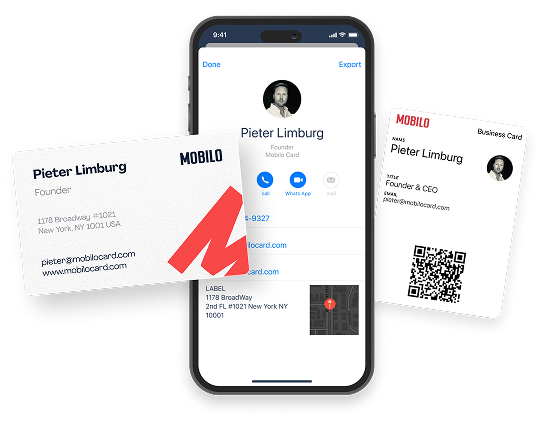
Traditional printed cards work well for many professionals, though they have limitations such as outdated information and inventory management challenges. Modern alternatives address these concerns by offering instant sharing capabilities and real-time updates. For those seeking a contemporary solution, Mobilo's digital contact card provides seamless contact sharing without the constraints of physical printing.
Table of Contents
- Are Business Cards Still Necessary in a Digital World?
- What Makes a Business Card Printing Service Actually Good?
- 18 Best Business Card Printing Services to Consider
- How to Choose the Right Business Card Printing Option for Your Needs
- Stop Losing the Contacts You Just Worked So Hard to Meet
Summary
Key Takeaways
- Business cards still carry significant weight in professional settings because 72% of people judge a company by the quality of its business cards. The physical card creates a tangible reminder that sits on desks and in wallets, becoming a concrete commitment to follow up rather than another digital interaction lost in crowded inboxes or LinkedIn requests. This tactile impression registers before anyone reads your name or title.
- Up to 90% of business contacts collected through paper cards never make it into a CRM or follow-up system. The gap between handing out a card and actually entering that information into sales workflows is where most networking investments disappear. Contacts get lost in pockets, conference bags, and desk drawers before teams can act on them, turning expensive networking events into missed opportunities.
- Premium card quality matters because the weight, texture, and finish communicate brand identity before a single word is spoken. Services offering 16pt cardstock or higher with specialty finishes like matte, soft touch, or spot UV create tactile differentiation that budget providers can't match. A flimsy card with smudged ink suggests carelessness, while quality stock signals you take your work seriously.
- Turnaround times vary dramatically between printing services, ranging from same-day pickup at locations like Staples to 2-10 business days for standard orders. Rush options can compress delivery to 24-48 hours, but typically add 40-60% to total costs through rush fees and expedited shipping. Planning ahead allows teams to access higher-quality printing without paying premium prices for speed.
- Paper cards become obsolete the moment your contact information changes, forcing expensive reprints and leaving hundreds of outdated cards in circulation. When your phone number updates, your role shifts, or your company rebrands, every printed card instantly becomes inaccurate. This creates a hidden cost that compounds over time as professionals cycle through job changes and company transitions.
- Mobilo's digital contact card addresses this by separating the physical card from the information it contains, updating profiles in real time, and capturing contacts directly into CRM systems through NFC taps or QR scans.
Are Business Cards Still Necessary in a Digital World?
Yes, business cards are still important. They create a physical reminder in an otherwise temporary digital exchange. While LinkedIn profiles and contact apps store information, a well-designed card signals that you are prepared, professional, and respectful.

🎯 Key Point: In our digital-first world, the tangible nature of business cards makes them stand out even more. They provide an immediate physical connection that can't be deleted, lost in a phone, or forgotten in the digital noise.
"A well-designed business card shows that you are prepared, professional, and respectful to the person receiving it." — Professional Networking Best Practices
💡 Tip: The key isn't choosing between digital or physical networking tools—it's using both strategically. Business cards complement your digital presence by creating a memorable touchpoint that recipients can physically hold and reference later.
How does physical connection create lasting impressions?
A business card creates a tangible reminder that sits on a desk, in a wallet, or pinned to a badge holder—something a digital exchange cannot replicate. When you hand someone a card, you give them control over the next step without requiring them to remember your name correctly, search through a crowded inbox, or scroll past LinkedIn requests. 72% of people judge a company by the quality of its business cards, meaning that a small rectangle carries significant weight.
What do design elements communicate about your brand?
The weight, texture, and design communicate brand identity before anyone speaks. A flimsy card with smudged ink suggests carelessness; thoughtful typography, quality stock, and clean edges signal professionalism. These micro-impressions accumulate quickly during conferences and networking events where dozens of interactions occur in minutes.
When Digital Networking Falls Short
Pulling out your phone mid-conversation interrupts momentum. You're navigating apps, checking spelling, or waiting for someone else to unlock their device. The exchange that should take three seconds stretches into an awkward minute of fumbling. Business cards eliminate that friction: one hand, one motion, conversation continues.
Not everyone uses the same platforms. Some professionals live on LinkedIn, others prefer email, and some rely on contact management systems that don't sync with modern apps. A business card works universally, requiring no compatibility checks, app downloads, or assumptions about someone else's tech preferences.
How do modern cards bridge physical and digital networking?
Modern cards integrate with digital tools through QR codes, NFC chips, and custom URLs, transforming a physical card into a gateway to your profile. A scan reveals portfolio samples, booking links, or case studies, making the card the first touchpoint in a multi-channel relationship.
What advantages do digital contact cards offer over traditional printed cards?
Solutions like digital contact cards eliminate the static limitations of printed cards. When your role changes, your phone number updates, or your company rebrands, digital profiles reflect those changes instantly without reprinting thousands of cards. The physical card creates that initial tangible connection while the information behind it stays current, trackable, and actionable through automated CRM workflows.
Where do business cards still dominate professional interactions?
Conferences, trade shows, and recruiting events require business cards as standard. Recruiters meeting dozens of candidates need efficient tracking systems. Artists and freelancers use cards to build credibility outside traditional corporate structures. Travelling employees use cards to navigate language barriers and cultural expectations, where sharing contact information digitally can feel intrusive.
Why do cards remain essential in fast-paced networking environments?
Professionals who dismiss cards as outdated typically work in industries where networking happens through scheduled video calls and email. But in a room with 200 people, 40 exhibitor booths, and six hours to make connections, cards remain standard equipment. The pace demands it.
If business cards still matter this much, their quality matters even more than most people realize.
Related Reading
- How Many Business Cards Should I Order
- Why Are Business Cards Important
- What to Put on a Business Card for Networking
- How Much Does It Cost to Make Business Cards
- What Should I Put on the Back of My Business Card
- Best Paper for Business Cards
- Glossy vs Matte Business Cards
- How Thick is a Business Card
- How Much Does Business Card Design Cost
What Makes a Business Card Printing Service Actually Good?
Quality separates memorable cards from forgettable ones. The best printing services deliver sharp registration, accurate color reproduction, and durable finishes without requiring extensive design expertise or lengthy turnaround times.
🎯 Key Point: A professional business card serves as your first impression – poor print quality can undermine your credibility before you even speak.
"83% of professionals believe that business card quality directly reflects the professionalism of the person handing it out." — Print Industry Research, 2023
💡 Pro Tip: Look for services that offer color-matching guarantees and use premium cardstock – these details make the difference between a card that gets kept versus one that gets discarded.
Quality Factor
- Print Resolution
- What to Look For: 300+ DPI
- Why It Matters: Ensures crisp text and sharp images
- Color Accuracy
- What to Look For: Pantone matching
- Why It Matters: Maintains brand consistency
- Paper Quality
- What to Look For: 14pt+ cardstock
- Why It Matters: Creates professional feel and durability
- Finish Options
- What to Look For: Matte, gloss, or UV coating
- Why It Matters: Adds visual appeal and protection
Paper Stock and Tactile Quality
How thick your cardstock is affects how it feels in someone's hand before they even read a word, creating a tactile impression. Premium services offer stocks ranging from 14pt to 32pt with matte, gloss, uncoated, and textured finishes. Thicker stock (16pt or higher) resists bending and conveys solidity and professionalism, while thinner stock feels flimsy and undermines credibility.
The finish you choose affects readability and durability. Matte surfaces resist fingerprints and glare under conference lighting; gloss finishes enhance colours but show smudges easily. Uncoated stock accepts handwritten notes, which matters when someone wants to jot a reminder during a conversation. Testing sample orders from multiple printers reveals how different stocks perform under real-world handling.
Print Quality and Color Accuracy
Sharp text rendering separates professional printing from amateur results, particularly on information-dense cards or those with small typography. Digital offset printing produces crisp edges and consistent colour across large runs, whereas lower-quality printers produce fuzzy text or misaligned graphics, which undermine credibility.
Color accuracy matters when your brand uses specific hues. Monitors display colours differently from printed materials, so printers that offer colour calibration or Pantone matching ensure your card reflects your brand palette. The best services provide proofs or sample prints before full production, preventing oversaturated or washed-out results.
Design Tools and Customization Flexibility
Easy-to-use design tools help non-designers create polished cards quickly. Drag-and-drop builders, ready-made templates, and live previews streamline the process, while services offering custom die-cutting, embossing, foil stamping, and spot UV coating expand creative options without requiring technical skills.
Some printers limit changes to template modifications, reducing card uniqueness. Others accept designs in multiple file formats, giving designers full control over layout and typography. Choose based on your design comfort level and how much your industry demands distinctive cards.
Turnaround Time and Shipping Reliability
Fast production timelines matter when preparing for events or replacing inventory. Standard turnaround is 2-10 business days, with rush options available at 24–48 hours for premium pricing. Processing time varies between services.
Shipping costs and international tariffs add hidden expenses to total project costs. US-based printers typically offer faster domestic delivery and lower shipping fees than overseas manufacturers, while tracking capabilities and delivery guarantees reduce anxiety when deadlines are tight.
How does per-card pricing scale with order volume?
The price per card decreases with larger orders: small orders might cost $0.50 per card, while bulk orders can drop to $0.25 or less. When comparing vendors, examine the total project cost, including taxes, shipping, and setup fees. Some services hide extra charges for shipping or design assistance, so verify all fees carefully.
What are the risks of ordering cards in bulk?
Bulk discounts encourage larger orders, but ordering 500 cards with outdated contact information wastes money if your role or company changes. Our digital contact card eliminates this risk by separating the physical card from the information it contains, updating profiles in real time without reprinting. Teams track which cards generate leads and measure conversion rates through integrated analytics, turning business cards into a measurable lead-generation infrastructure.
Why does design quality matter more than printing?
Even the best printing service cannot fix a card design that fails to communicate clearly or a distribution strategy that treats cards as disposable.
Related Reading
- Best Font Size For Business Cards
- Best Color For Business Cards
- Business Card Design Tips
- Professional Business Card Design Ideas
- Digital Business Card Examples
- Business Cards Finishes
- Best Business Card Apps
- Should Business Cards Be Double-Sided
- Business Cards Etiquette
18 Best Business Card Printing Services to Consider
Your business card is a judgment call before you say a word. 72% of people judge a company based on the quality of their business cards, so flimsy stock or smudged ink undermines your credibility before the conversation starts. The right printer matches your budget, timeline, and brand standards without unnecessary minimums or upsells.
"72% of people judge a company based on the quality of their business cards." — Uprinting Business Card Statistics
🎯 Key Point: The quality of your business card directly impacts first impressions and professional credibility.
Choosing a printing service means matching its capabilities to your needs. A real estate agent distributing 50 cards monthly has different requirements than a startup founder ordering 5,000 for a trade show. Below are 18 services organized by their strengths, ideal users, and trade-offs.
🔑 Takeaway: The best printing service isn't universal—it's the one matching your specific volume, budget, and quality requirements.
1. Mobilo
Ready to transform your team's networking and generate 10x more leads at every event with Mobilo's digital business card? Join over 59,000 companies using smart digital business cards that automatically share contact information, enrich lead data, score prospects against your ICP, and integrate directly with your CRM.
Who should use it
Sales teams, event marketers, and professionals are tired of watching 90% of their paper card contacts disappear into coat pockets and never enter their pipeline.
Key features
Three smart modes (personal landing page, automated lead capture, instant contact exchange), real-time CRM sync, lead scoring, analytics dashboard, NFC-enabled physical cards, QR codes, and virtual profiles.
Pros
- Automatically captures and enriches lead data without manual entry
- Tracks who views your card and when
- Updates your details across all shared cards instantly
- Integrates with major CRMs (Salesforce, HubSpot, Pipedrive)
- Provides team-level analytics and ROI tracking
Cons
- Requires prospects to have smartphones for NFC tap or QR scan
- Initial setup takes longer than ordering paper cards
Book a demo today and receive your first 25 Mobilo business cards free (worth $950).
2. Vistaprint
Vistaprint delivers excellent print quality, offers good design tools, and offers reasonable prices, plus promotional products like mugs, posters, and tablecloths, allowing you to order all your brand materials from one place.
Who should use it
Small business owners seeking reliable quality at reasonable prices who may need promotional materials from a single vendor.
Key features
wide paper selection, QR code generator, extensive template library, and promotional products from the same seller.
Pros
- Excellent print quality
- Good card-designing tools and paper selections
- Reasonable prices
- Prints a wide range of promotional products
- QR code generator
Cons
- Lots of upsell attempts during checkout
- Templates aren't as slick as some competitors
3. PSPrint
Most business card printers require a minimum order of 100 cards, but PSPrint allows orders as few as 25 cards and as many as 10,000. For 50 cards, pricing starts at $15.06, with ground shipping for 250 cards at $4.99.
Who should use it
Business owners wanting small quantities without per-card markups, or those testing new designs before committing to bulk orders.
Key features
Low minimums (25 cards), wide selection of card stocks (14 pt, 16 pt, pearl, uncoated, glossy), multiple sizes (standard, mini, square).
Pros
- Good card design interface
- Good print quality
- Inexpensive
- Flexible quantity options
Cons
- No snap guides in the design interface
- Pricing structure can be unclear
4. EliteFlyers Business Cards
EliteFlyers offers high-quality business card stocks and textures with professional printing, powerful online design tools, and design services.
Who should use it
Businesses ordering 500+ cards seeking high-quality stock options and professional design support.
Key features
Flexible online card designer, professional design services, and a wide variety of stocks and textures.
Pros
- Versatile online card designer
- Offers professional design services
- Fine printing quality
- Timely shipping
Cons
- Templates not organized by business type
- Most choices require a minimum order of 500 cards
- Some cardstock options don't have design templates
- Not the cheapest option
- Occasional color accuracy issues
5. MOO
MOO is one of the sleekest card printing services around, offering top design templates, high-end options, and premium packaging that feels like unboxing a luxury product.
Who should use it
Designers, creative professionals, and brands prioritize visual sophistication over cost per card.
Key features
Stylish templates, the ability to alternate images within a single order, premium packaging, and high-end finish options.
Pros
- Stylish card templates
- Let's you alternate images in a single order
- Excellent shipment packaging
Cons
- Significantly higher price than most card-printing services
- Rigid designs don't let you customize enough
6. Staples Print & Marketing Services
Staples Print & Marketing Services offers same-day pickup at many locations, with online design tools and quality printing. Order by mid-day for same-day service.
Who should use it
Professionals who need cards for immediate use at meetings, conferences, or networking events.
Key features
Same-day pickup, clean online builder, quality commitment with reprints, and frequent discounts.
Pros
- Same-day service at many locations
- Excellent card design interface
- Good print quality
Cons
- Fewer cardstock and shape options than competitors
7. GotPrint
With cards starting at $8.96 for 100 cards, GotPrint is one of the most affordable business card printing services available. Despite the low prices, it offers full-colour printing and instant online proofs.
Who should use it
Business owners who want good quality but need to spend as little money as possible.
Key features
Low pricing, an online card design tool, unusual card shape options, and a free sample kit.
Pros
- Inexpensive
- Good online card design tool
- Unusual card shape options
- Puzzles and many other printing options
Cons
- Less modern templates than some competitors
- No snap to align in the card design interface
- Limited fonts
- Inferior print and paper quality in entry-level offerings
8. Jukebox
Jukebox delivers business cards that make a strong impression with bright colours, clear text and graphics, thick cardstock, and the most accurate trim among the services tested.
Who should use it
Professionals who view their business card as a brand investment and want premium quality that justifies the higher cost.
Key features
Thick, substantial cardstock; accurate trim; vibrant colour reproduction; fresh design options.
Pros
- Punchy colors and crisp text/graphics
- Most accurate trim among competitors
- Thick and stiff cardstock
- Fresh, exciting design options
Cons
- Second to third most expensive service, depending on order size
9. FedEx Quick Business Cards
FedEx Quick Business Cards deliver acceptable quality in under 24 hours. Print quality is sharp for text and graphics, though noticeably flimsy compared to premium services, and it includes occasional alignment and trim issues.
Who should use it
Professionals in an emergency who need cards tonight and can accept lower quality than premium services.
Key features
Less than 24-hour turnaround, widespread availability, sharp text and fine-line elements, and easy ordering.
Pros
- Available in less than 24 hours
- Sharp text and fine-line elements
- Easy to order
Cons
- Flimsy-feeling compared to premium options
- Somewhat wonky alignment and trim
- Lower quality than top services
10. Impress
Impress offers a simple mobile experience for ordering business cards from your iPhone without a computer. The app transforms digital designs into physical cards with thick stock, bright colours, and sharp text. The quality falls between FedEx Quick Business Cards and Jukebox's precision printing, though the price per card runs slightly higher than either.
The iPhone-only limitation excludes Android users. For iOS professionals, the interface is intuitive. You can upload custom designs or select from simple templates, make basic edits, and preview digital proofs through an interactive 360-degree view.
Customer service runs through iMessage, creating a conversational experience that feels less like corporate support and more like texting a colleague. That speed matters when you need to fix a design issue or confirm delivery timing before an event.
Who should use it
Mobile-first professionals with iPhones who prioritize convenience over platform flexibility.
Pros
- Slick, intuitive iPhone app interface
- Thick cardstock with vibrant color output
- iMessage-based customer service for immediate responses
- Digital proofs with 360-degree preview functionality
Cons
- Unavailable for Android users
- Print accuracy doesn't match Jukebox's precision
- Higher per-card cost than some competitors
11. Zazzle
Zazzle is a design marketplace with over 400,000 unique templates from independent creators. If your brand needs visually distinctive finishes (holographic, watercolour, opal stone, dripping glitter), this platform offers creative options that standard printers cannot match. Standard cards with custom designs start at $22.06 per 100.
Paper stocks come in standard, recycled, premium, and deluxe options, with specialty finishes including foil, marbled patterns, and agate textures. This variety aligns with specific style preferences, though its prices exceed those of volume-focused competitors. The platform does not offer free samples to check quality before ordering.
Zazzle Black subscribers receive free shipping, and students qualify for 25% discounts. QR codes integrate directly into designs, linking physical cards to digital contact sharing.
Who should use it
Business owners who prioritise unique, standout designs over cost savings.
Pros
- 400,000+ design options from independent creators
- Specialty finishes (holographic, foil, watercolor, agate)
- Multiple paper stocks, including recycled options
- QR code integration available
- Student discounts and Zazzle Black free shipping
Cons
- No free samples available
- Higher pricing than volume-focused services
- Design variety can overwhelm decision-making
12. UPrinting
Custom-shaped die-cut cards distinguish UPrinting from competitors offering only rectangular cards. Choose from 14-point or 16-point cardstock in silk, soft touch, antibacterial, premium foil, or spot UV finishes. Available shapes include square, rectangle, circle, oval, half circle, and leaf. Waterproof plastic cards come in white, frosted, or clear.
What are the limitations of UPrinting's custom shapes?
The service doesn't offer physical samples of custom shapes, creating uncertainty about how designs will appear in final products. While a free digital proof is provided, assessing tactile elements like edge smoothness or material thickness requires trusting the preview. Print time for die-cut cards extends to six business days.
Painted-edge cards and velvet-finish printing on 16-point cardstock add premium touches. The platform also handles complementary business products—posters, banners, labels, and car wraps—for maintaining visual consistency across marketing materials.
Who should use it
Businesses want custom-shaped cards with specialty finishes.
Pros
- Die-cut cards in multiple custom shapes
- Silk, soft touch, antibacterial, foil, and spot UV finishes
- Waterproof plastic card options
- Painted edge and velvet finish capabilities
- Wide range of complementary business products
Cons
- No physical samples for custom shapes
- Six-day print time for die-cut cards
- Higher cost for specialty shapes and finishes
13. 123Print
Bulk ordering is what makes 123Print special. The platform handles orders up to 50,000 cards, with the best price (5 cents per card) starting at 10,000 units. A maximum order of 50,000 cards costs $2,578.50. This capacity serves teams distributing cards at conferences, trade shows, or multiple retail locations.
What quality and shipping options does 123Print offer?
Ultra-thick matte stock (260-pound) offers double the thickness of standard cards, creating a tactile weight that conveys substance. The fastest shipping includes U.S. next-day air by 10:30 a.m., though Alaska, Hawaii, and Puerto Rico require expedited air shipping with additional costs.
The service doesn't ship outside the U.S. or Canada. Free samples let you assess quality before committing to large orders. Loyalty cards and a design editor provide additional features beyond basic business cards.
Who should use it
Businesses requiring 10,000+ units at volume pricing.
Pros
- Handles up to 50,000 cards per order
- Best rate (5 cents/card) at 10,000+ quantity
- Ultra-thick 260-pound cardstock available
- Next-day air shipping option
- Free samples and loyalty card printing
Cons
- No international shipping (U.S. and Canada only)
- Alaska, Hawaii, and Puerto Rico require expedited air shipping
- Volume pricing only beneficial for large orders
14. PrintPlace
Folded business cards provide extra space for discounts, service menus, appointment reminders, or product photos. PrintPlace's folded cards measure 4-by-3.5 inches and fold down to 3.5-by-2 inches. They ship flat with scoring for easy hand-folding.
You can order as few as 25 cards or as many as 500,000 units. Choose from four cardstock options and gloss or uncoated finishes, including matte and high-gloss UV. The single size option limits customisation compared to standard rectangular cards.
What are the preparation requirements for PrintPlace cards?
Folding by hand adds an extra step before sending items out. For small amounts, this works, but for large quantities, it becomes time-consuming. Free samples let you test the folding process and check print quality before placing a large order.
Who should use it
Businesses need extra information space on cards (menus, discounts, schedules).
Pros
- Low 25-card minimum quantity
- Orders up to 500,000 cards
- Four cardstock options with multiple finishes
- Free samples available
- Affordable pricing for the folded format
Cons
- Single-size option for folded cards
- Manual folding required (ships flat)
- Time-intensive preparation for large quantities
15. PrintRunner
PrintRunner offers 32 pt uncoated cardstock with 17 painted edge colour options, including metallics. Cards come in three sizes (standard 2-by-3.5 inches, Euro 2.125-by-3.375 inches, and square 2.5-by-2.5 inches) and feel roughly 2 pts thicker than a credit card. According to Brian Turner's review based on over 30 years of publishing experience, the unpainted white edge creates an understated, minimalistic luxury look. Fade-resistant printing ensures longevity, though shipping costs are high unless you spend at least $69 for free shipping.
Who should use it
Business owners who want special painted edge cards, particularly those ordering large quantities, can offset shipping costs.
Pros
- Fast turnaround
- 17 painted edge colour options
- Fade-resistant printing
- Metallic finishes
- Double-sided printing
Cons
- Poor customer reviews
- High shipping costs for orders under $69
16. Staples
Staples solves the urgent deadline problem with same-day pickup at most locations on eligible styles, ideal for networking events starting tonight. The online builder moves quickly without overwhelming customization options, and you can upload print-ready 3.75-by-2.25-inch files for edge-to-edge designs. Pricing remains competitive with frequent discounts, and delivery often triggers free ground shipping on orders above a minimum. The quality commitment includes reprints if something isn't right, though design capabilities lag behind those of MOO or Vistaprint for teams seeking creative differentiation.
Who should use it
People in jobs requiring same-day completion who can pick up items at a nearby store.
Pros
- Same-day pickup availability
- Fast online builder
- Competitive pricing with frequent discounts
- Quality guarantee with the reprint policy
Cons
- Requires local store access for same-day service
- Less design-forward than specialized competitors
17. Overnight Prints
Overnight Prints built its reputation on the BITGIT (Buy it Today, Get it Tomorrow) service: orders placed by 8:00 pm EST arrive the next day without store pickup. The company offers unique shapes (square, Euro, circle, mini) that help brands stand out, paired with high-quality printing and fair pricing.
Who should use it
Remote professionals or busy executives who need next-day delivery without store pickup.
Pros
- Next-day delivery via BITGIT
- Unique card shapes
- High-quality printing
- Fair pricing
- Nationwide availability
Cons
- No notable drawbacks
18. Clubcard Printing
Clubcard Printing delivers graphic design excellence across a wide range of materials: laminated, 100% recycled, coated, uncoated, and foil business cards. This variety lets you match card material to brand personality, whether you want bold foil accents or understated recycled stock that signals environmental values, giving environmentally conscious brands genuine sustainability without sacrificing visual impact.
Who should use it
Brands seeking high-quality graphic design with environmental responsibility, particularly those prioritising recycled materials.
Pros
- Great graphic design service
- Numerous card types and materials
- 100% recycled options available
- Strong customer service
Cons
- No notable drawbacks
How can digital solutions enhance traditional business card networking?
Regular cards make a great first impression, but don't let you track which connections turn into business relationships. Platforms like digital contact card combine physical presence with lead capture automation, measuring which networking efforts generate pipeline while eliminating manual CRM data entry that slows follow-up momentum.
How to Choose the Right Business Card Printing Option for Your Needs
The right printing service depends on whether you're trying to save money, work fast, stand out with creative design, or handle large volumes of work. A freelance photographer needs different services than a sales team that distributes 5,000 cards every 3 months. Match your needs—budget, timeline, quantity, and design complexity—to each printing company's strengths.
🎯 Key Point: Your business type and volume requirements should drive your printing choice - a single entrepreneur has vastly different needs than a high-volume sales organization.
💡 Pro Tip: Consider your quarterly card usage when evaluating cost per unit. Bulk orders often reduce costs by 30-50%, but only if you actually use the quantity within 6-12 months.
"Business card quality directly impacts first impressions, with premium finishes increasing perceived professionalism by up to 40% in client interactions." — Print Industry Research, 2024
Business Type: Freelancers/Solo
- Recommended Option: Online printing services
- Key Priority: Cost efficiency
Business Type: Small Teams (2-10)
- Recommended Option: Local print shops
- Key Priority: Quick turnaround
Business Type: Large Sales Teams
- Recommended Option: Bulk commercial printers
- Key Priority: Volume discounts
Business Type: Creative Industries
- Recommended Option: Specialty/premium printers
- Key Priority: Unique materials
⚠️ Warning: Don't choose premium specialty printing for high-volume, frequent distribution scenarios - the extra cost rarely justifies the ROI when cards are handed out in large quantities at trade shows or networking events.
Budget-Conscious Teams
GotPrint and PSPrint offer acceptable quality at the lowest cost per card. GotPrint's 100-card orders start at $8.96, making them suitable for sending cards to many people without expecting most to keep them. PSPrint allows orders as small as 25 cards, useful for testing designs or specific job roles.
The tradeoff appears in paper weight and finish consistency. Cards feel lighter, colours shift from initial samples, and edges aren't always cut accurately on complicated layouts. For networking situations where cards get stacked and reviewed later, the cost savings justify the quality differences. For client interactions where cards represent your brand, the savings don't offset the poor impression.
How do premium materials impact first impressions?
MOO and Jukebox make cards that demonstrate quality before anyone reads your name. Thick cardstock, precise trim, bright colour reproduction, and specialty finishes (soft touch, spot UV, foil stamping) create a tactile difference that budget providers cannot match.
According to the I You Print Blog Article, 72% of people judge a company by the quality of its business cards. Premium stock directly builds credibility during first impressions.
When does the premium investment make sense?
These services cost 2-3 times more than budget options, but the investment makes sense when cards represent your primary marketing asset. Creative professionals, consultants, and agency principals competing on design sophistication need cards that reflect that positioning.
Handing someone a flimsy card while discussing brand strategy undermines the conversation.
When should you use rush printing services?
Staples and FedEx Quick Business Cards solve last-minute needs when you're attending an event tomorrow, and inventory is depleted. Same-day or next-day turnaround eliminates shipping delays, though quality suffers compared to services with longer production windows. Text remains sharp enough to communicate essential information, but cardstock feels thin and colours lack the depth that premium printers deliver.
Use these services as emergency solutions, not defaults. If you know a conference is three months away, ordering from Vistaprint or PrintRunner produces noticeably better results for comparable pricing. Rush fees and expedited shipping add 40–60% to total costs; that money is better spent on higher-quality stock when timelines allow proper planning.
How do digital solutions eliminate printing waste?
Most teams treat business cards as static assets. They print large batches and use them until contact information changes or supplies run out. When your phone number updates, your job title shifts, or your company rebrands, every distributed card becomes outdated immediately. This necessitates expensive reprints and leaves hundreds of old cards languishing in desk drawers.
Solutions like digital contact card eliminate this waste by separating the physical card from the information it holds. Our digital contact card updates profiles in real time without reprinting and tracks which interactions convert to the pipeline through integrated CRM workflows.
But choosing the right printing service matters only if those cards generate follow-through—where most networking investments quietly disappear.
Stop Losing the Contacts You Just Worked So Hard to Meet
Paper business cards get lost. Studies show that up to 90% of business contacts never make it into a CRM or follow-up system, ending up forgotten in pockets, conference bags, or desk drawers.
"Up to 90% of business contacts never make it into a CRM or follow-up system, ending up forgotten in pockets, conference bags, or desk drawers." — Wave Connect Study

🚨 Warning: Traditional networking methods are causing you to lose 9 out of 10 potential leads you work so hard to meet at events.
Mobilo solves this problem with smart digital business cards that instantly share contact information with a tap. Every interaction automatically captures lead data, enriches contacts, scores prospects against your ICP, and syncs directly with your CRM.
💡 Key Benefit: Your team walks away from every event with organized, qualified leads instead of a stack of paper cards that will likely be lost or forgotten.
Join more than 59,000 companies already using Mobilo to modernize their networking. Book a demo today and receive your first 25 Mobilo digital business cards free (worth $950).
Related Reading